Tag
Tags are used for organising information by labelling each piece with a number of keywords. Each tag is usually a link that leads to an index page listing all the content associated with that tag/keyword. This way tags allow the user to navigate through content based on keywords rather than a hierarchical structure.
Tags are mostly added to content or items informally grouped either by the creator or by the consumer, but can also be chosen from a controlled vocabulary depending on the context.
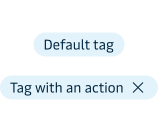
With action
An closing action can be applied to the tag. Tags can be permanent or removable depending on the context. For example, removable tags can be used to show the user which filters that has already been applied and thereby also let the user remove individual filters. Permanent tags can be used to communicate the status of a piece of information e.g. “In progress” and “Completed”.
Appearances
The tag component comes in the following appearances:
- Neutral = Grey
- Info (general information) = Blue
- Success (positive information) = Green
- Warning (important information demanding the user’s attention) = Yellow
- Error (critical messages requiring user action) = Red
The info, success, warning and error tags should be applied according to our guidelines for notifications.