Input Group
Combining components to support a well-defined user task.
Best practice
- Only combine inputs that are contextually related, and that support a well-defined task.
- Avoid combining too many inputs together - ideally between 2-3 inputs.
- Validate inputs independently unless they are interdependent.
- Ensure each input has a unique and descriptive label to communicate the purpose.
- Avoid relying on placeholder text only.
Usage
Use Input Groups when inputs are contextually related, and they support a well-defined user task, e.g. selecting a currency and entering an amount.
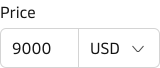
Use the Input Group to combine components to support a well-defined task.
Supported components
The most common components to be used in the input group are Input, Select and Button, but the component suppport the following components:
Use cases
The Input Group can be used to support many different use cases, the following are just a few examples.
Search

Combine input and button to create a search component.
Phone number

Combine select and input to create a phone component.
Route

Combine two typeaheads to create a route component.
Placement
The Input Group can contain different combinations of the supported components and can therefore be used in many different contexts, but they are often placed in:
- Forms and Data Entry
- Search and Filtering options
- Modals and Drawers
- Cards