Loading Indicator
Best practice
- Clearly communicate the purpose of loading using concise labels and aria-labels. (e.g Loading table data)
- Use loading indicators when the duration of loading is unknown or can’t be predicted.
- Consider using the toast component to let users know when loading is completed or has failed.
Usage
Loading indicators can be embedded in various UI elements or even full pages to indicate information is being loaded. However, there are instances where you should avoid using them or opt for the progress indicator that can better manage the user’s expectation by showing measurable progress.
| Scenario | Loading indicator | Progress indicator |
|---|---|---|
| Unknown task duration | Ideal choice | Not suitable |
| Known, measurable progress | Not suitable | Ideal choice |
| Brief interactions (<1 second) | Unnecessary visual noise | Unnecessary visual noise |
When to use
- When processing duration is unpredictable, such as retrieving shipment data from multiple systems.
- For processes initiated by user actions, such as submitting forms or generating complex reports.
- For progressive disclosure components like drawers that load dynamic shipment information.
- Use bar loading indicator for containers (e.g., top of screens and drawers).
- Use ring loading indicator variant for compact spaces (e.g., buttons, list items, or table cells)
When not to use
- When processing duration and progress are known and measurable, use the progress indicator instead.
- For very short waiting periods (<1 sec. ), avoid loading indicators to prevent unnecessary visual distraction.
Variants
There are two variants of the loading indicator that can be applied depending on the interface requirements and user needs. These indicators visually communicate that a process is ongoing, but the exact duration or progress cannot be accurately determined.
Bar loading indicator
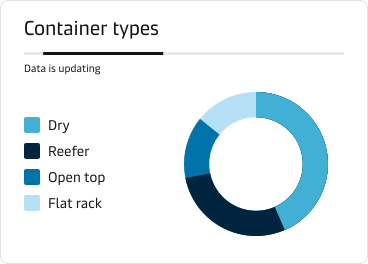
The bar loading indicator works effectively in wider or horizontal areas such as dashboards, form headers, or at the top of pages. It visually indicates indeterminate loading processes, reinforcing to users that the application is actively working, for example, loading new data in widgets or performing bulk updates on shipment statuses.
Ring loading indicator
The ring loading indicator is ideal for displaying indeterminate processes in areas such as drawers, tables, buttons, or long lists. It communicates clearly to users that an action is in progress, such as fetching shipment details or dynamically populating logistics data.

Accessibility
- Use adequate colour contrasts between progress indicators and their backgrounds.
- Make sure aria labels are present and represent correctly the label.
- Consider visually hidden status updates via live regions for screen reader users, especially for critical real-time task updates.