Error messages
General considerations
The best error message is the one that never gets written, as errors throughout Maersk products and platforms should be prevented by proactively informing the user of relevant information. For this reason, it pays to be prepared and support our customers.
Proximity
As an overall rule, always provide information and guidance on what the error is and how to solve it close to where the problem happens.
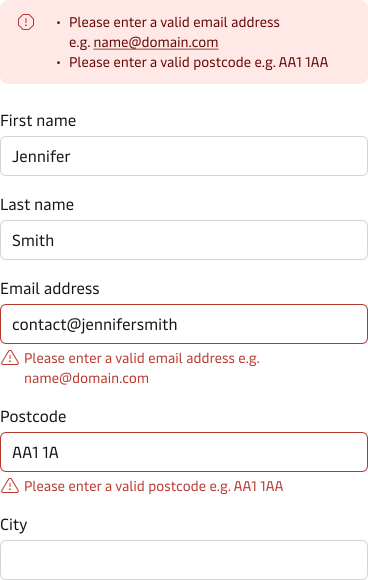
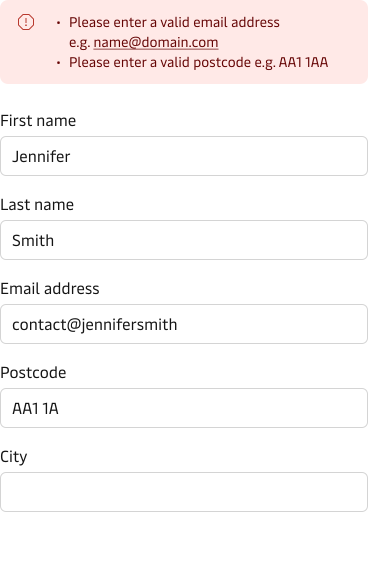
In longer forms, it can be helpful to display an error summary at the top of the form, so that the user easily can get an overview of what error needs fixing. This doesn’t replace the error messages underneath the erroneous input fields but should be seen as additional help.
Severity & urgency
It is important that the user understands the severity and urgency of the error and knows if the issue needs immediate attention or if it can wait for later. If you are looking for more general guidance on how to give users feedback (task-triggered or system-triggered feedback), then please read our system feedback guidelines.
Timing
It is always good to consider when the error message should be displayed. Showing an error message prematurely will lead to confusion and annoyance - and in the end, it can cause the user to make more errors and not be able to resolve the initial one. This is especially true in cases where inline validation triggers errors before the user is finished typing.
Contrast
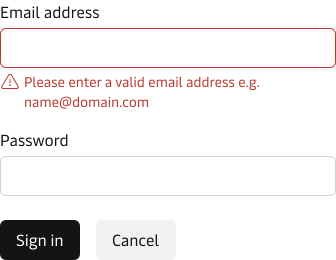
Contrast plays an important role in making sure that the error message can be read by users who have vision impairment. Ensuring that we meet the WCAG 2.2 - Level AA requirements for colour contrast is crucial to make sure that the error message is accessible. Read more about colour contrast in our Accessibility checklist.
Writing error messages
A number of additional aspects should be taken into account when writing error messages.
Tone-of-voice
Important note: before writing any error messages, it is important to familiarize ourselves with the Maersk brand values and the tone of voice (TOV).
Read more about the Maersk tone of voice.
Use a language that is relatable, kind, and easy to understand
Error messages are typically part of a negative journey, especially if they are triggered from user input that is incorrect. e.g., Wrong password. This can prevent or delay an action, causing frustration. Avoid being accusatory, derisive, or judgemental. The error text should be straightforward but kind - short and concise using legible and readable text. Avoid using technical or Maersk-specific jargon, but instead use the words that the user would expect in the context. Avoid the use of error codes and abbreviations.
Don’t blame the user - be positive and helpful
- Never blame the user. Error messages must be positive without neglecting the severity of the issue.
- Avoid using humour since that can easily be misunderstood and result in a negative effect.
- Always make sure to adjust the tone of voice. It is a good idea to make the error message human, positive and polite. Keep your text simple and use kind words such as “Please”, “Sorry”, Kindly”, etc.
Describe what happened
Make sure that you precisely describe what the issue is and avoid generic error messages such as “an error has occurred” without specifying what error, since this will leave the user questioning what happened. Instead, provide a clear and concise description of what happened and suggest how to resolve the issue in the best possible way.
Describe how to resolve the issue
A good error message both describes the issue but also gives clear, good advice on how to resolve the issue. In cases where the error message is more than a sentence, then consider highlighting the key information, so that it is easier to scan. If you add links to the error message, then make sure that they are as descriptive as possible. Read more about link best practices on our link component page.
Dos and don’ts
Do | Don't |
|---|---|
| Please enter a valid postcode e.g. AA1 1AA. | Wrong post code. |
| Please enter a valid email address. | Enter a valid email address. |
| Sorry, the document couldn’t be uploaded. Please try again. | Upload failed. |
| Unfortunately, the document is not available. Please refresh the page or try again later. | Document not available. |
| Sorry, invoices for the selected items are not available. Please check the ETA/ETD of the vessel or contact customer service. | Action not possible. |
| Unfortunately, we are experiencing some issues. Please refresh the page or try again later. | The system gives no response. |
| Sorry, you seem to not have access. Is this wrong? Please try again or contact customer service. | You don’t have access. |
| Sorry, your log in session has expired. Please login again to continue. | Log in timeout. |
If you have a restricted text space (e.g. error prompt in forms) try to convey the same tone but shortening to the minimum message.
To summarise:
- Find where errors may occur and prevent them, when possible.
- Consider when / where the error message should be displayed.
- Be positive and helpful - avoid being accusatory, derisive, or judgemental.
- Describe what caused the error.
- Suggest how the user can resolve the issue.
Need help writing an error message? Raise your issue in our UX Writing hotline chat.