We’re pleased to share some significant new features and give you a preview of our ambitious plans for Q3 2025!
New features
Search in select
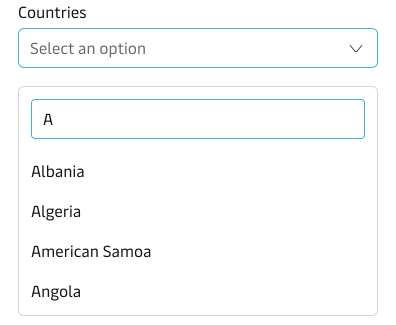
We have added the ability to filter options in the Select and Multi-select components. This feature is particularly useful when the list of options contains more than 10-15 items, making it much easier for users to find and select the options they need.
This enhancement improves the user experience by reducing the time needed to locate specific options in longer lists and makes these components more scalable for larger datasets.
Typeahead with Multi-Select
A new component has arrived! This extends our existing Typeahead component by adding the capability to select multiple items. By default, each selected option is displayed as a tag, providing clear visual feedback of the user’s selections.
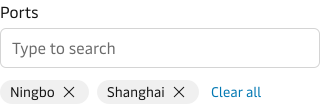
The component also supports several advanced features:
- Free text tagging - users can create their own tags, not just select from existing options
- Programmatic control - developers can determine how and where selected options are rendered
This component supersedes the Tag Multiselect that we originally contributed to the Community UI library.
You can find more information on the Typeahead Multi-Select page.
Q3 ambitions
We have now prioritised our product ambitions for Q3 2025. Here are the highlights:
AI initiatives
AI colour role
The MDS currently supports colour roles such as primary, secondary, error, success, and more. Working with Corporate Branding, we’re proposing to create a similar colour role specifically for AI interfaces and interactions.
AI guidelines
Working with Mia Stigsnaes-Hansen and her team in TbM, we will be establishing the foundation of AI guidelines in the context of user interfaces, helping teams create consistent AI-powered experiences.
AI experiments
We’re working on several AI initiatives:
- A MDS-based Model Context Protocol (MCP) solution to enhance developer workflows
- Bringing Microsoft Copilot into the MDS website, tailored to summarise and answer general questions about the MDS and its guidelines
All The Way brand refresh part 2
Building on our recent brand refresh implementation, we’re planning improvements to focus and disabled states that align with our new visual design language, ensuring a cohesive experience across all component states.
Component enhancements
Calendar improvements
We’re enhancing the year/month user experience within the Calendar component, in addition to reassessing how we support date range selection to make it more intuitive and efficient.
New toolbar component
A new toolbar component is in development, which will support the standardisation of common table-based UX patterns, helping teams create more consistent interfaces.
Input button group component
We’re introducing a new component that allows “joining” form controls and buttons together. This component enhances the user experience by providing a more organised and intuitive interface for various contexts, such as toolbars and action groups.
Ask me anything sessions
We will be setting up new fortnightly “Ask me anything” drop-in sessions. These sessions will provide a chance to get quick product updates and ask the team any questions you may have about the MDS.
Please reach out to us if you would like to know more about anything in this article or have any feedback on these developments.