Breakpoints define how layouts adapt to different viewport and container sizes, ensuring a consistent and usable experience across mobile, tablet, and desktop devices. Use these breakpoints to help you create layouts that are predictable and scale gracefully from handheld devices on the warehouse floor to widescreen dashboards in control centers.
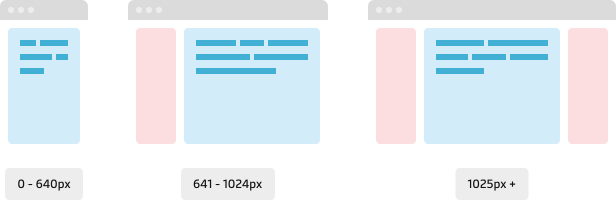
Breakpoints values
The Maersk Design System defines five breakpoints applicable for viewports and content containers. By default the breakpoints respond to the viewport size.
| Breakpoint name | Width (px) | Context |
|---|---|---|
| xs - extra small | 0-640 | Delivery truck drivers marking delivery on mobile phone app. |
| sm - small | 641-1024 | Using tablet device at a warehouse or terminal. |
| md - medium | 1025-1440 | Viewing not a full screen browser window on a laptop. |
| lg - large | 1441-1920 | Typical external screens in the office. |
| xl - extra large | 1920 + | Wide screens and high resolution screens. |
Container-based breakpoints
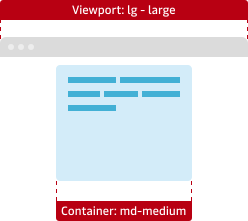
Container-based breakpoints respond to the width of the container rather than the entire viewport. This enables more granular control over layout behavior—allowing components to adapt based on their immediate context. It’s especially effective in complex or modular layouts where sections of a page need to remain visually consistent, even within wider screens.
Considerations
- Validate and test the layouts across devises to ensure the consistent user experience.
- Design for the breakpoints that make sense in the application or website context. If 100% of the user base uses desktop mobile viewports should not be a priority.
- Test if rich media such as images and videos adapt well across the breakpoints you are using.
- Make sure to use the column grid to further enhance the responsiveness of the interface.